
Introduction to Vibe-Coding in SiteBook: Building custom apps in SiteBook with AI
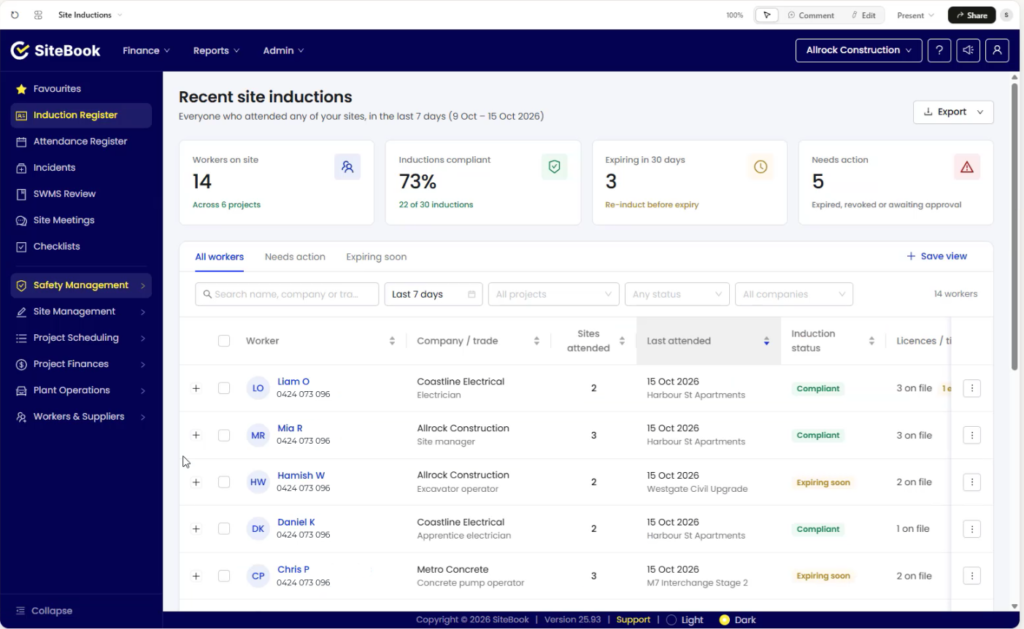
In SiteBook’s latest update, we have added support for custom apps.
What this means, is that by using AI-powered development tools like ChatGPT and Claude, you can now create your own applications directly within SiteBook – no programming knowledge required.
What is Vibe Coding?
‘Vibe coding’ is when you instruct an AI-model to build an app for you by telling it what to make in plain English rather than writing the code yourself. This means anyone can build an app, and any SiteBook user can build an app that interfaces directly with SiteBook.
This opens up a myriad of options for apps like custom reporting dashboards, tools to cross-reference site data, and allows users to create tools tailored specifically to your business.
For example:
“Create a custom app that displays site inductions across all projects for users who have attended any site in the last 7 days.”
The AI-model will then (by making use of SiteBook’s AI Connector) build the requested app and make it available in SiteBook immediately when ready.
Want to change something? Just ask. The AI-Model is fully capable of editing it’s own applications.
Whether you’re adding a new feature, changing the layout, adjusting colours or troubleshooting an issue, you can continue refining your app with simple conversational instructions.
For example:
“Add an Export button, and a search function to filter results by Project.”
This means you can progressively improve your custom apps as your requirements change, without having to rebuild them from scratch.
Custom Apps Using Your SiteBook Data
SiteBook’s existing AI connector enables supported AI assistants to securely access your project data at a read-only level. This provides a foundation for building custom applications that work with your existing projects and records.
For example, you could create:
- Custom Induction Dashboards: Display site induction records in a dedicated interface, with tailored search and filtering options.
- Site Attendance Reporting: Build an application that presents attendance information in a format suited to your reporting requirements.
- Project Information Dashboards: Bring relevant project information together into a simplified, easy-to-navigate view.
- Custom Reporting Tools: Design specialised reports and interfaces that better suit your internal processes.
These are just a few examples of what’s possible. Rather than being limited to standard reporting layouts and interfaces, you can explore applications designed around how your business actually operates.
And because these applications can be built with AI assistance, you don’t need to start with a technical specification or write the application code yourself.
Getting Started
For users with an existing subscription to ChatGPT or Claude, you’ll be able to set up the SiteBook AI-Connector.
With this set up, you’ll be able to begin building by using the prompt “Create a custom app in SiteBook…” and then describe your app.
Apps can then be accessed in the website and mobile app by going into the Custom Applications module.
Once available, further updates can be made by asking your AI-model for changes to the app.
All that’s required to access custom apps is setting up the SiteBook AI-Connector.
If you’re interested in setting up the connector, a full step-by-step guide for both ChatGPT and Claude can be found in the SiteBook Help centre.
If you have any questions, contact our support team.
