
Power BI reporting dashboards now available in SiteBook
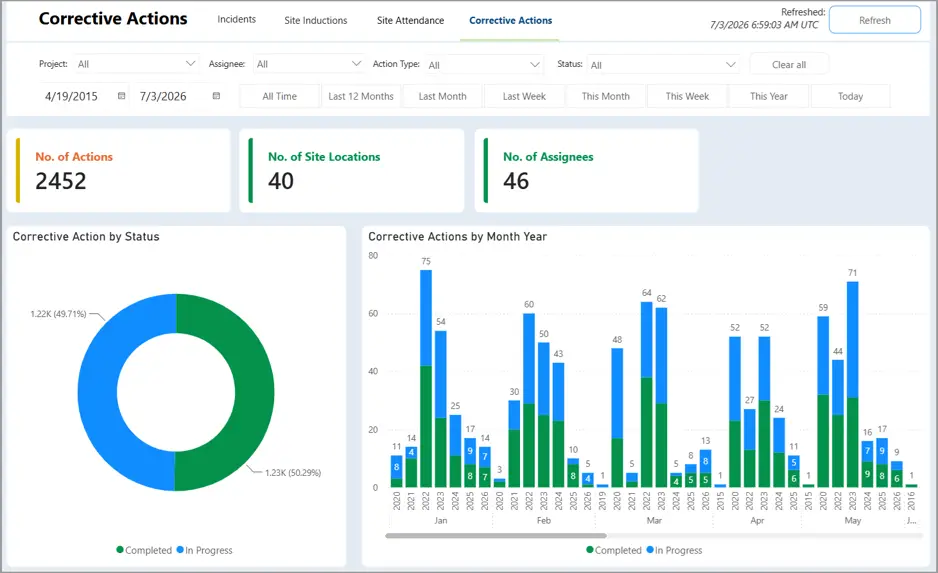
We’re excited to announce that Power BI reporting dashboards are now available in SiteBook for Safety Pro users and above, providing greater visibility into your projects through powerful, interactive reporting.
A complimentary dashboard template is included, giving you instant access to key operational and safety metrics across your business.
Included Dashboards:
Site Inductions
A full induction overview for each project with a full statistical breakdown across your worksites. Most importantly, contains an action list of Pending Inductions by Company to help direct attention towards non-compliant contractors.
Site Attendance
General attendance metrics with a useful breakdown of Hours Spend by Project and Attendance by Location to help identify labour breakdowns and activity across your projects.
Corrective Actions
Corrective Actions assigned via SiteBook processes (Checklists & Inspections, Defect Lists, etc.) can be viewed in Power BI as a general indicator of completion. Compare In Progress vs. Completed Actions across all sites, with a full breakdown of how actions are arising to help identify areas for improvement.
Incidents
Incidents can be tracked in SiteBook by location and incident category giving a full overview of site incident activity for the specified timespan. Use these insights to identify trends and strengthen your safety management processes.
Export Tools & Customisability
Take advantage of the full range of Power BI functionality, including interactive filtering, drill-down reporting, spotlight features and export options to help you analyse and share your data.
Need something more tailored? Our development team can create custom Power BI dashboards to include data from your Site Management, Scheduling, and Finance modules for a nominal fee.
If you’d like to learn more about SiteBook’s Power BI integration or discuss custom reporting, please contact our support team.
